
Modern work has a frustrating habit of spreading itself across too many places. Tasks live in one app, project briefs sit in another, feedback disappears inside chat, meeting notes remain forgotten, and progress reports require manual updates. ClickUp brings these moving parts into one connected productivity platform. It combines project management, tasks, Docs, Chat, Whiteboards, dashboards, time tracking, automations, calendars, goals, and AI-powered assistance inside a customizable workspace. Whether used by a freelancer, a growing agency, a software team, or an entire enterprise, ClickUp helps transform scattered activity into structured work that people can understand, manage, and complete.
Tasks Become a Clear Path From Idea to Delivery
ClickUp’s task system gives teams a central place to define what needs to happen, who owns it, and when it should be finished. Tasks can include assignees, due dates, priorities, attachments, checklists, comments, custom fields, and nested subtasks. Relationships and dependencies connect work that must happen in sequence, while milestones mark the most important moments within a project.
Custom statuses allow every team to reflect its own process rather than accepting a rigid workflow. A marketing team might move work from “Briefing” to “Writing,” “Review,” and “Published,” while developers may use stages such as “Backlog,” “In Progress,” “Testing,” and “Done.” Recurring tasks handle repeatable responsibilities, and templates save teams from rebuilding common project structures every time.
Multiple Views Make the Same Work Easier to Understand
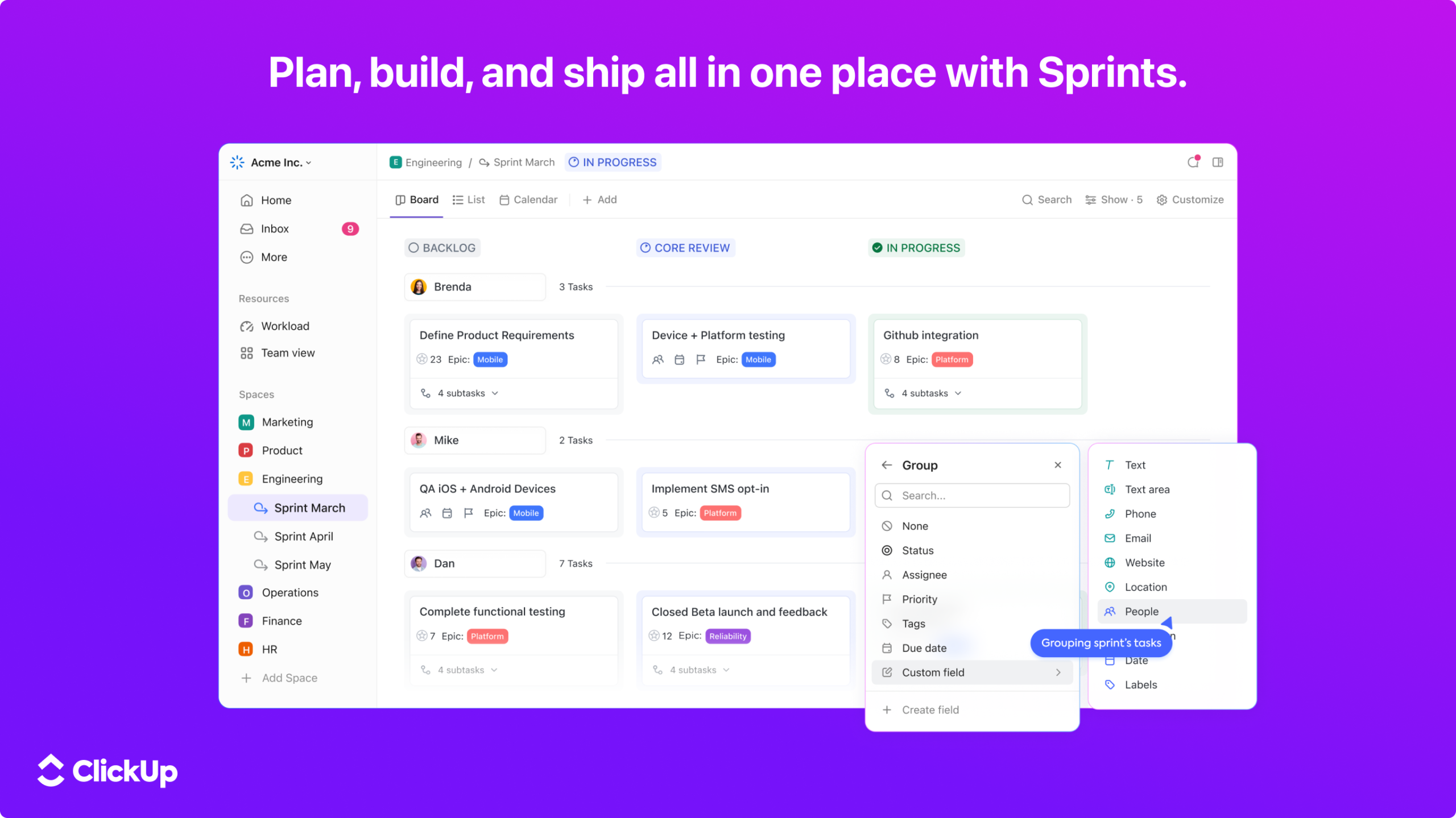
Different people interpret projects in different ways. ClickUp offers more than 15 customizable views so each person can see the same underlying work in a format that suits their role. List View provides a straightforward task structure, Board View creates a drag-and-drop Kanban workflow, and Calendar View places scheduled work across days, weeks, or months.
Gantt charts reveal timelines and dependencies, while Table View gives project data a spreadsheet-like layout. Workload View helps managers evaluate team capacity, and Map View supports location-based tasks. Whiteboards and Mind Maps provide more visual approaches to planning. Because teams can switch views without recreating the project, ClickUp keeps the information consistent while allowing different perspectives.
One Platform With an Impressive Toolkit
ClickUp calls itself the Everything App for work, and its feature range explains that ambition. Teams can begin with simple task management and gradually activate more advanced capabilities as their workflows mature. Thousands of ready-made templates also shorten setup time for common use cases.
Notable ClickUp capabilities include:
- Tasks, subtasks, priorities, dependencies, and custom statuses
- List, Board, Calendar, Gantt, Table, Map, and Workload views
- Docs and wikis connected directly to projects and tasks
- Real-time Chat linked to relevant workplace context
- Whiteboards and Mind Maps for visual collaboration
- Goals, milestones, portfolios, and project dashboards
- Built-in timers, time estimates, and team timesheets
- Forms that convert submitted information into tasks
- Automations that update work according to chosen rules
- ClickUp Brain, AI Notetaker, Talk to Text, and Super Agents
- More than 1,000 integrations with external tools
The exact limits and advanced features vary by subscription, so teams should compare the current Free Forever, Unlimited, Business, and Enterprise options before choosing a plan.

Docs, Chat, and Whiteboards Keep Context Close
Project work slows down when important explanations live far away from the tasks they support. ClickUp Docs can hold briefs, meeting notes, standard operating procedures, product requirements, and internal wikis. Documents can be shared, edited collaboratively, and connected to actionable tasks so knowledge does not remain separated from execution.
ClickUp Chat places real-time conversations inside the work environment, reducing the need to constantly move between a messaging tool and a project platform. Assigned comments turn feedback into clear action items instead of leaving requests buried inside long threads. Whiteboards add a visual canvas where teams can brainstorm, map processes, and convert ideas into actual tasks. Together, these tools keep conversation, knowledge, and delivery closely connected.
ClickUp Brain Adds AI That Knows the Work
Generic AI tools can help with writing, but they often lack the context behind a project. ClickUp Brain works within the workspace and can use information from tasks, Docs, conversations, decisions, and activity history. This allows users to ask questions about current work, generate summaries, create content, or surface information without manually assembling the entire background.
The broader AI ecosystem includes AI Notetaker for transcribing meetings and producing summaries with action items, Talk to Text for turning spoken thoughts into formatted work, and AI Fields for automatically generated updates. Super Agents can operate more like digital teammates by completing assigned workflow activities. Brain MAX extends the experience with multiple premium AI models and search across connected applications, helping reduce repeated switching between tools.
Dashboards and Time Tracking Reveal What Is Really Happening
A project can appear busy while still making very little progress. ClickUp Dashboards use customizable cards to display workload, task status, goals, time data, and other project indicators. Because this reporting draws from activity inside the workspace, managers can monitor current conditions without requesting another round of manually prepared updates.
Built-in time tracking records how long work takes, while estimates help teams plan before a project begins. Timesheets consolidate logged hours for review, making the feature useful for agencies, consultants, and businesses managing billable work. Goals and rollups connect daily tasks with broader objectives, allowing leaders to see whether completed activity is actually contributing to meaningful results.
The Moment Work Stops Feeling Scattered
ClickUp’s greatest strength is not simply the number of features it offers. Its real value comes from connecting those features so that a conversation can lead to a task, a task can connect to a Doc, time can be recorded against the work, and progress can appear automatically on a dashboard. Every step retains its context instead of becoming another isolated update.

The platform can remain simple for a small team or grow into a highly customized operating system for a complex organization. With templates, integrations, automation, and AI assistance, ClickUp reduces administrative friction and gives people more time for valuable work. When everything finally has an owner, a deadline, and a visible purpose, productivity stops being a vague ambition and starts becoming a repeatable team habit.